Home Page Carousel
Each published Home Page Carousel record becomes a hero slide at the top of the homepage.
Where records appear
| Website location | Presentation |
|---|---|
| Homepage hero | Up to five responsive slides, ordered by ascending rank |
The slide contains an image background, optional date/time/location, a two-line title, a two-line subtitle, and an optional button. Profile controls its section colour.
Frontend example
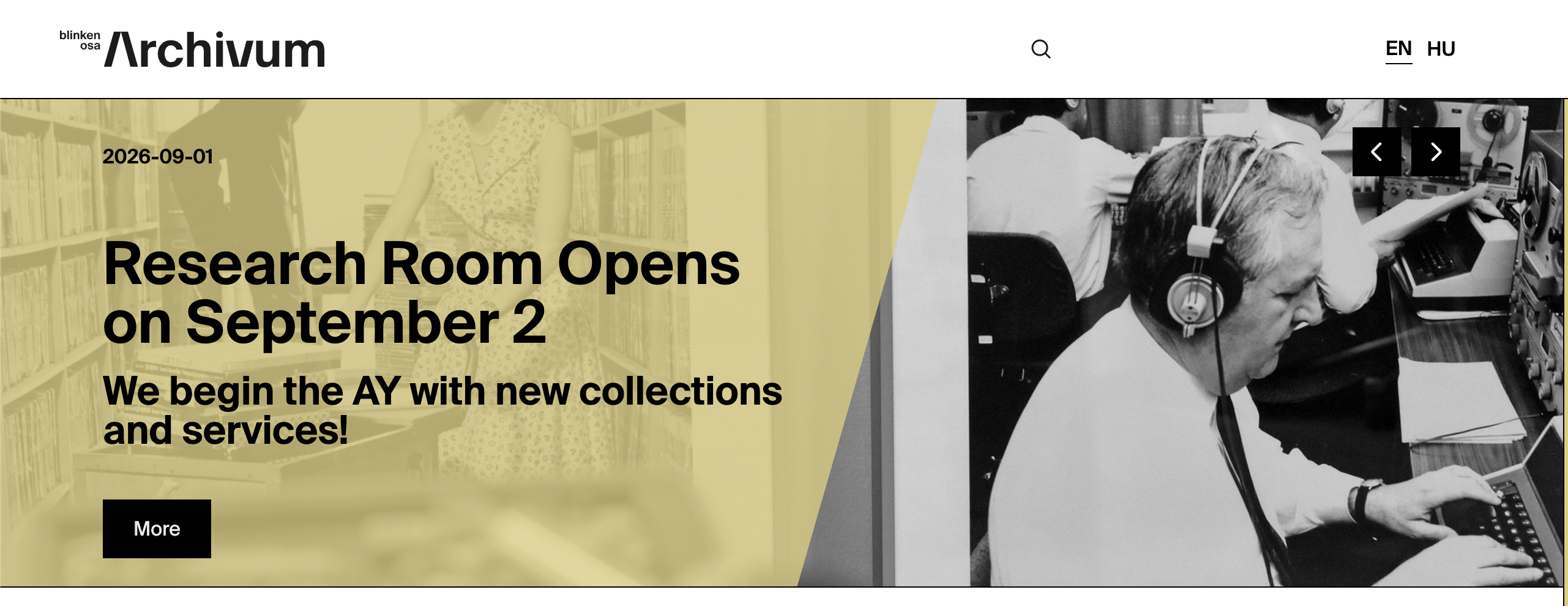
An Archivum-profile carousel slide. The profile supplies the yellow overlay, while the record supplies the image, text, date, and call-to-action.
Field-to-frontend map
| Strapi field | Scope | Where on the frontend | Display and editorial effect |
|---|---|---|---|
Date |
Shared | Hero top row | Printed when present. |
Image |
Shared, required | Full hero background | Responsive small/medium/full image source. |
Location |
Localized | Hero top row | Printed beside/below date information. |
Title1stRow |
Localized, required | Hero title | First title line. |
Title2ndRow |
Localized | Hero title | Optional second title line. |
Subtitle1stRow |
Localized | Hero lower area | First subtitle line. |
Subtitle2ndRow |
Localized | Hero lower area | Optional second subtitle line. |
Link |
Localized | Not displayed/used | Current hero does not read this field. |
ButtonText |
Localized | Hero call-to-action | Creates a button when not empty. |
ButtonLink |
Localized | Hero call-to-action | Button destination; without it the visible button has no navigation target. |
Time |
Shared | Hero top row | Displayed beside Date, shortened to hours and minutes. |
rank |
Shared | Slide ordering | Lower values appear first. Keep ranks unique. |
Profile |
Shared | Slide background colour | Selects Archivum, Collections, Academic, or Public styling. |